Quick Start Guide to Baking on Tezos's Quantumnet

There’s a new test network Quantumnet on Tezos for testing the post-quantum features. And it’s easy to get involved and help test. The web site with all the network details is Quantumnet.pqpark.dal.nomadic-labs.com and there is a detailed tutorial. If you want to know more about Quantumnet, there’s the Introduction article and details of the approach.
This is a quick start guide to get you going without digging into the details below. We’ll use Debian Linux 13 throughout, but you can use Ubuntu 24.04 as well. It will work on arm64 and x86_64 platforms.
-
Get yourself a Debian Linux 13 server with 4 cores, 16GB of RAM and 400GB of disc. GCP or AWS or your favourite cloud provider will have one for you.
-
Log in to the machine, update the operating system
$ sudo apt update
$ sudo apt upgrade -y
- Add the packages GPG key to your system
$ sudo apt install -y gpg curl
$ curl -s "https://apt.tzinit.org/keys/tzinit.asc" | \
    sudo gpg --dearmor -o /etc/apt/keyrings/tzinit.gpg
Note: The command gpg /etc/apt/keyrings/tzinit.gpg should return the hash:
pub   ed25519 2026-07-13 [SC]
      181E6294A0770AE9AF0173B21F688E1201D819B4
uid           Tzinit Repository Key <packages@tezos.foundation>
- Add the Quantumnet compatible Octez packages repo to your system (this is the software that implements the Tezos blockchain):
$ echo "deb [signed-by=/etc/apt/keyrings/tzinit.gpg] https://apt.tzinit.org/QUANTUM/debian trixie main" \
    | sudo tee /etc/apt/sources.list.d/tzinit-octez.list
If you want to use Ubuntu 24.04, replace debian with ubuntu and trixie with noble in the above.
- Get the catalogue and install the client, node, DAL node and baker:
$ sudo apt update
$ sudo apt install -y octez-client octez-node octez-dal-node octez-baker
- Check the version
$ octez-client --version
9ffb1f7d (2026-09-15 10:54:57 +0200) (Octez 25.0~rc1+dev (build: 0))
- As the tezos user, configure the node, get and import a snapshot. This is a backup of the blockchain and importing it will help your node synchronise faster. You might not need the synchronisation threshold option as the network gets bigger.
$ sudo su - tezos
$ octez-node config init \
	--network https://quantumnet.pqpark.dal.nomadic-labs.com/network.json \
	--rpc-addr 127.0.0.1 --net-addr 0.0.0.0 --history-mode rolling \
	--synchronisation-threshold=0

$ wget https://quantumnet.pqpark.dal.nomadic-labs.com/snapshots/latest.rolling
$ octez-node snapshot import latest.rolling
$ exit
- Start the node:
$ sudo systemctl enable octez-node
$ sudo systemctl start octez-node
-
Check the logs
/var/log/tezos/octez-node.logand you will see the node synchronising with the network. -
Now generate the baking keys. The master baker key can be a
tz5key (mldsa44) - one of the new quantum resistant keys. You cannot bake with these keys, but on Quantumnet we usetz6keys (xmss) for consensus. Both keys are on disc, but we are playing with test networks, so don’t worry too much. These should be in the tezos account so that the baker can get to them. The xmss key takes a little while to generate.
$ sudo su - tezos
$ octez-client gen keys my_quantum_baker --sig mldsa44
$ octez-client gen keys consensus-1 --sig xmss \
	--xmss-slot-start 0 --xmss-slot-end 131071
$ octez-client list known addresses
consensus-1: tz6JwJkwUGhWkPSJ2xfBaufqqP53FprApc9i (unencrypted sk known)
my_quantum_baker: tz5SMkYeLCD5UzyiNwnkp9PjX6bDgQNjekSu (unencrypted sk known)
$ exit
-
Note that you do not need a companion key.
-
Get some funds from the Quantumnet Faucet:
In your browser, go to quantumnet-faucet.pqpark.dal.nomadic-labs.com,
use the tz5 address and obtain 6500tz.
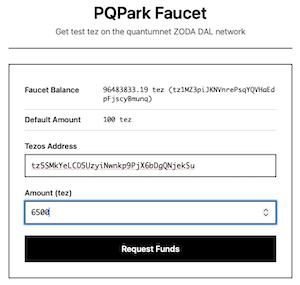
- Self delegate and stake
$ sudo su - tezos
$ octez-client get balance for my_quantum_baker
6500 ꜩ
$ octez-client register key my_quantum_baker as delegate
$ octez-client stake 6000 for my_quantum_baker
$ octez-client set consensus key for my_quantum_baker to consensus-1
$ exit
- Set up the DAL node with your baker’s tz5 address
$ sudo su - tezos
$ octez-dal-node config init --data-dir=/var/tezos/.tezos-dal-node \
	--attester=tz5SMkYeLCD5UzyiNwnkp9PjX6bDgQNjekSu
$ exit
$ sudo systemctl enable octez-dal-node
$ sudo systemctl start octez-dal-node
-
You can check the logs
/var/log/tezos/octez-dal-node.logfor progress -
Finally run the baker
Make sure that the following are in /etc/default/octez-baker:
DAL_OPTIONS="--dal-node http://localhost:10732"
LQ_VOTE="pass"
Then:
$ sudo systemctl enable octez-baker
$ sudo systemctl start octez-baker
- Your consensus key will at some point run out of slots. It has 131071 slots and an attester uses 2 per block (attestation and pre-attestation). At the time of writing, on Quantumnet, this is about 3 days. You’ll need to generate a new one and restart your baker as follows:
$ sudo su - tezos
$ octez-client gen keys consensus-2 --sig xmss --xmss-slot-start 0 --xmss-slot-end 131071
$ octez-client set consensus key for my_quantum_baker to consensus-2
$ exit
$ sudo systemctl restart octez-baker
You can automate this. In the tezos account, save this script as rotate.sh (such scripts are only suitable for testing):
#!/bin/sh

date=`date +%Y%m%d%H%M%S`
octez-client gen keys consensus-${date} --sig xmss --xmss-slot-start 0 --xmss-slot-end 131071
octez-client set consensus key for my_quantum_baker to consensus-${date}
octez-client show address consensus-${date}
pkill octez-baker
Then run it from cron every 2 days. As tezos, run crontab -e and add this line (adjusting the paths as necessary):
0 12 * * 0,2,4,6 /bin/bash /var/tezos/rotate.sh
The baker runs under the tezos user and systemctl should restart it, so the pkill works here. Alternatively you could give tezos enough sudo rights to run systemctl and do sudo systemctl restart octez-baker instead.
If you decide to stop baking on Quantumnet, you can be a good citizen by unstaking and returning the funds to the faucet (replace 6500 with the correct balance).
$ sudo su - tezos
$ octez-client unstake everything for my_quantum_baker
(wait for 4 cycles)
$ octez-client finalize unstake for my_quantum_baker
$ octez-client transfer 6500 from my_quantum_baker to tz1MZ3piJKNVnrePsqYQVHaEdpFjscyBmunq
$ exit